INTEGRATIONS / BOUNCIE
Your truck location and inventory. In one place.
Connect Bouncie to see a service truck's last known location, vehicle status, and trip history inside InventoryHQ. Keep the truck's existing inventory alongside its vehicle data.

Vehicle tracking

Truck inventory
Requires a Bouncie device and an active Bouncie subscription for each connected vehicle, plus an InventoryHQ account.
Bouncie devices and subscriptions are purchased separately through Bouncie.
WHAT YOU SEE
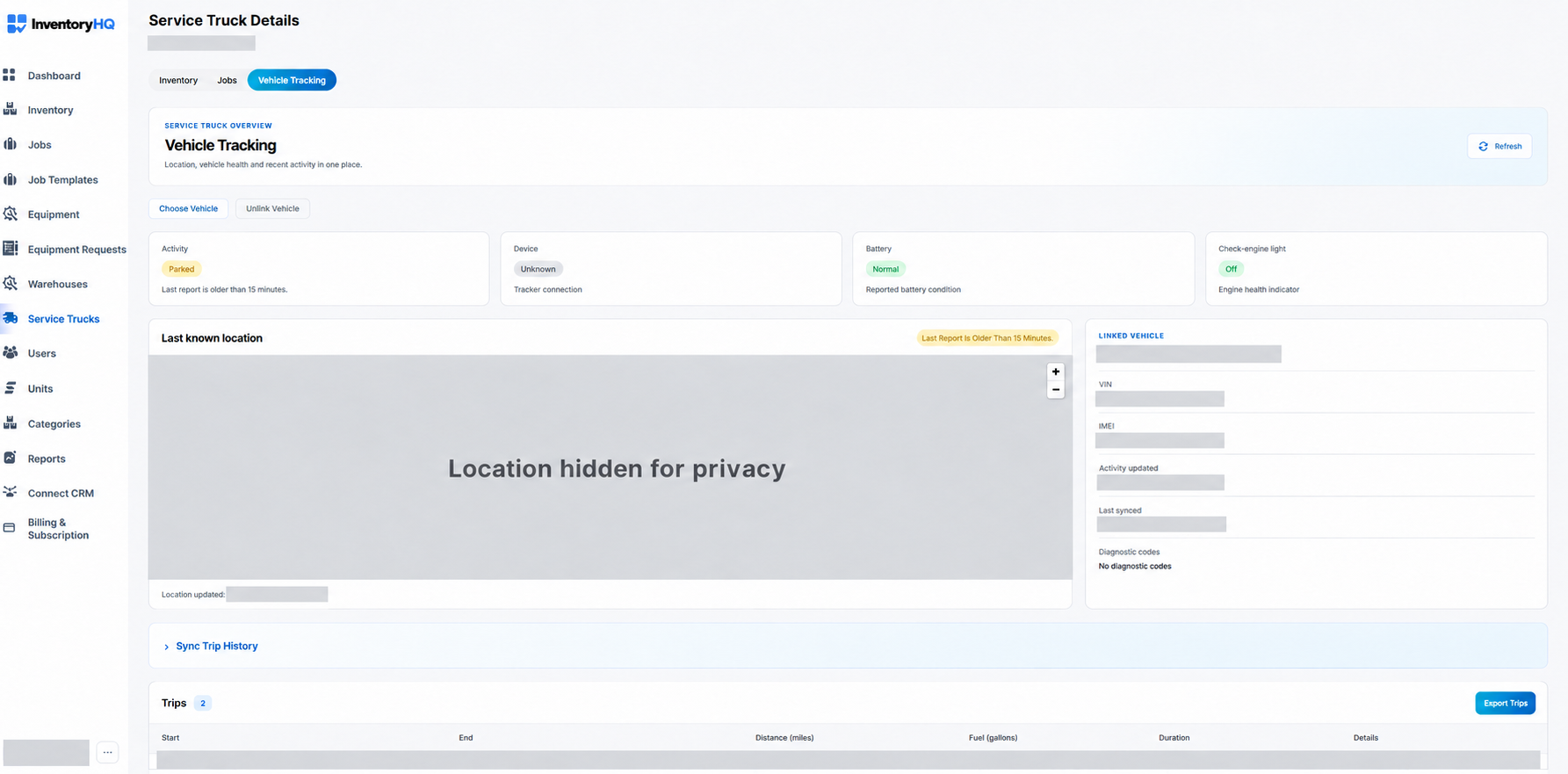
Vehicle data next to what's on the truck.
Last known location
See where each service truck was last reported, under View > Vehicle Tracking.
Vehicle status
Activity, battery, check-engine light, and diagnostic codes for each linked truck.
Trip history
Distance, fuel, and duration for each trip, with details and the GPS route.
Sync Trip History
Pull the latest trips from Bouncie when you need them.
Export Trips
Download the trip list for your own records.
Inventory stays put
Each truck keeps its existing inventory alongside its vehicle data.
Built for service trucks. Your field team keeps scanning material and tools the same way.
GETTING STARTED
Two ways to get started.
Requires a Bouncie device and an active Bouncie subscription for each connected vehicle, plus an InventoryHQ account.
New to Bouncie?
- 1Check vehicle compatibility and purchase a device through Bouncie. View devices & subscription details on bouncie.com (opens in a new tab)Check compatibility and setup on bouncie.com (opens in a new tab)Links open bouncie.com.
- 2Download the Bouncie app, create an account, and follow the guided setup and installation. Bouncie starts each device's subscription when it is installed.
- 3Once the vehicle is set up in Bouncie, connect it in InventoryHQ.
Already use Bouncie?
- 1In InventoryHQ, open Service Trucks and select Connect Bouncie.
- 2Sign into Bouncie and authorize vehicle access.
- 3Link each authorized Bouncie vehicle to the right InventoryHQ service truck.
- 4Open that truck's Vehicle Tracking to view location, vehicle health, and trips.
Questions before you get started?
Do I need a Bouncie subscription?
Yes. Each connected vehicle needs a Bouncie device and an active Bouncie subscription. You get both separately through Bouncie.
Who can view Bouncie vehicle data?
Company admins and users who have been given permission to access service trucks can view the truck data.
Does it work for equipment?
No. Bouncie connects to service trucks only. Equipment is tracked with QR labels and checkouts.
Do I need to sign in to Bouncie?
Yes. During setup you sign into Bouncie and choose which vehicles to authorize.
What happens to the inventory already on my trucks?
It stays in place. Linking a vehicle adds its Bouncie data alongside the truck's existing inventory.
Try it on your own shop.
14-day trial. No card. Unlimited users. Send us your list and we'll load your inventory for you.
Start 14-day trial